
Check the musical target
Set the key and compare with the original. The intended melody and expressive exceptions remain musical decisions.
VOCAL PITCH CORRECTION · VST3 / ARA 2
Set the key, let the automatic pass do the groundwork and refine individual notes. Keep slides, vibrato and the character of your take in focus.
29 € once · VAT included · both plugins · no subscription
Introductory price through 30 November 2026. Regular price: €59 from 1 December.
Buy for 29 € · Hear the comparison →
Fully unlocked trial. No account or payment details.
Windows x64 & Apple Silicon Mac · VST3
ARA 2 editor · Vocal Rack also works without ARA
Now available for Apple Silicon. See the Mac version →
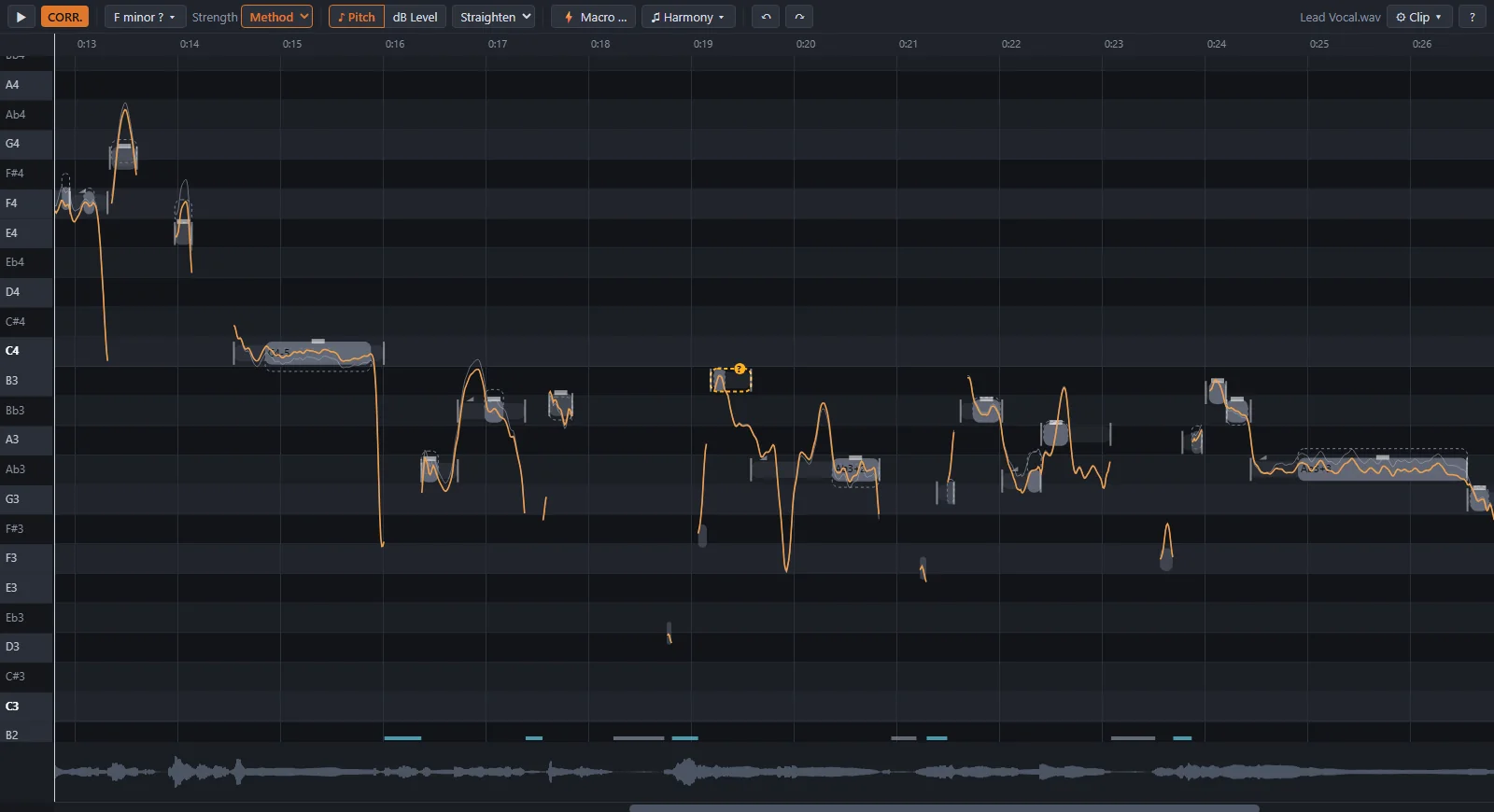
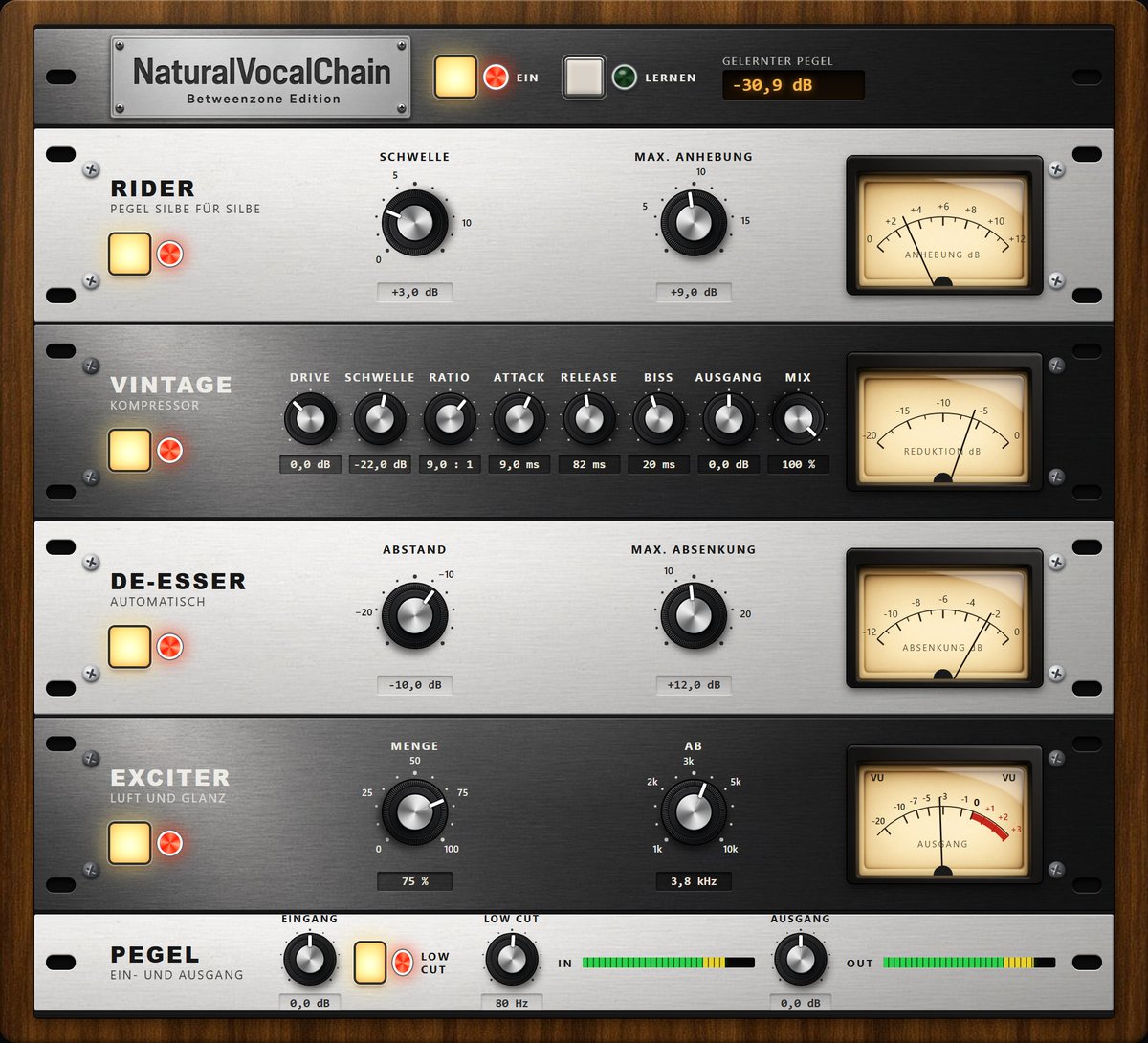 Vocal Rack included.Rider · compressor · automatic de-esser · exciter
TWO NEW RECORDINGS · G MINOR
Start playback and switch between the original and the correction at the same position. Choose vocal only or with band, then add the Vocal Rack if you want.
HEAR IT. THEN MAKE IT YOURS.
See how to move and split notes and shape vibrato after the automatic pass. Then hear the new G-minor vocal comparisons.
Real editing in the NaturalTune note editor, with English narration and captions. German interface shown. Listening comparisons use singer-supplied exports; additional manual vibrato is labelled.
MADE FOR A REAL STUDIO WORKFLOW
I wanted to tune my own vocals naturally without spending so much time on individual edits. VariAudio felt too slow and laborious for my workflow. The sound I was getting from Auto-Tune felt too artificial for my music. Melodyne sounded fine, but its workflow never quite clicked for me. That is why I started building NaturalTune.
The vocals in the two new G-minor examples on this page are my own voice, corrected with the plugin I built for that job. Listen to the original, the automatic pass and the separately labelled manual vibrato. You can judge the result for yourself.
I learned audio engineering at SAE, sang in bands for many years and have been producing music since 1997. My best-known music project is Betweenzone. I also work as a lawyer. Years of working on vocals shaped the workflow I wanted from NaturalTune.
THE THINKING BEHIND THE SOUND
Choose the right key and let the automatic modes provide a starting point. NaturalTune separates pitch position, slow drift and vibrato, so centring a note can retain its sung movement.
100 cents = 1 semitone. The pitch centre is the sustained pitch around which vibrato moves. Shifting a centre that is 20 cents flat can retain that motion; Method additionally reduces slow drift.
Set the key and compare with the original. The intended melody and expressive exceptions remain musical decisions.
Natural shifts pitch while retaining drift and vibrato. Method additionally centres sustained sections and reduces slow drift by 50%, retaining vibrato.
Split, join or move notes. Edit drift, vibrato and transitions. Manual pitch choices take priority over the automatic suggestions.
A semitone is 100 cents. The pitch centre is the sustained pitch around which the voice moves, rather than every vibrato peak. For example, moving a centre from 20 cents flat to the target retains the modulation in Natural; Method also reduces slow drift by half at its preset. We use pitch centre rather than a simple average of the whole contour, including slides.
In Natural, 40 cents is a criterion for an additional correction of sustained subsections. It is not a universal correction bypass: smaller deviations can already be corrected in the underlying note plan. Manual edits take priority.
| Mode | Sustained pitch / drift | Vibrato |
|---|---|---|
| Natural | Shift pitch position; retain slow drift. | Retained |
| Method | Centre pitch, reduce drift by 50%. | Retained |
| Strong | Centre pitch, straighten drift completely. | Retained |
| Full | Centre pitch, straighten drift completely. | Reduced to zero |
Method, Strong and Full also offer continuous strength from 0–100%. The table describes their preset values.
The original recording receives relative pitch changes. Check the key and intended melody; unusual notes and large corrections may require manual editing. Natural and Method provide starting points, followed by selective correction and artistic choices. The number of manual steps saved depends on the take and desired result.
Measurements for the listening example →TWO PLUGINS. ONE VOCAL SUITE.
Let Natural or Method handle the initial tuning, then shape selected moments. The workflow reduces repeated manual steps while leaving the artistic decisions with you.
Four modes, a continuous strength control and separate treatment of sustained pitch, drift and vibrato.
02 / EDITMove, split, join and straighten notes exactly where you want to intervene.
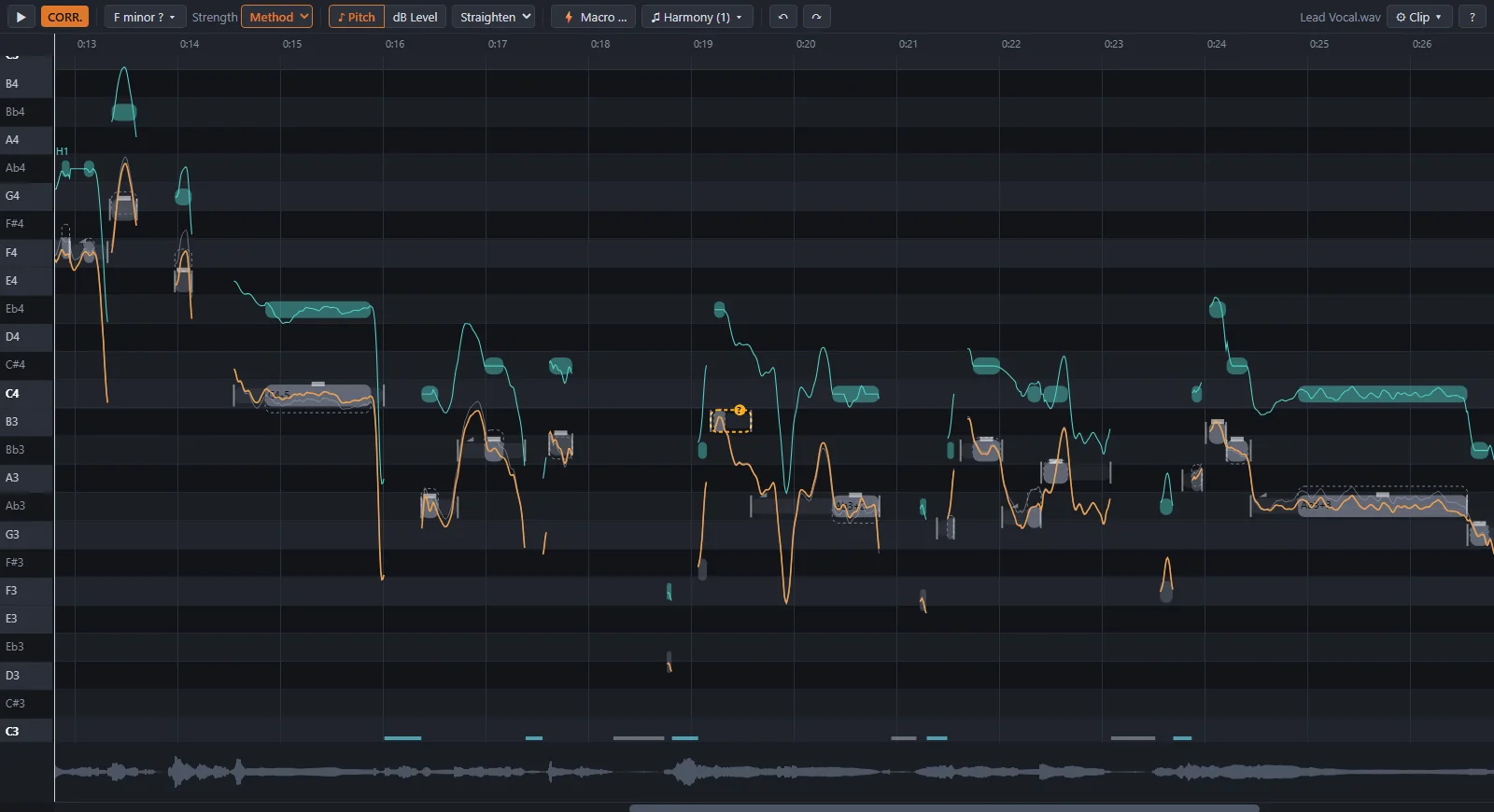
03 / HARMONYCreate additional voices, choose their intervals and adjust individual harmony notes.
04 / VOCAL RACKRider, vintage compressor, automatic de-esser and exciter as a separate VST3 insert.
INCLUDED: THE VOCAL RACK
A separate VST3 insert for playback and mixing. Learn the vocal level during playback and switch the modules independently.
Raises quiet vocal syllables towards the preceding louder level. Set the threshold and maximum lift, reducing small fader adjustments.
Control density and transients with threshold, ratio, attack, release and mix. Compare the result at a suitable output level.
Detects overly loud S sounds and reduces them relative to the surrounding vocal. Set the distance and maximum cut; there is no search frequency to tune.
Shapes the upper frequencies and adds subtle harmonics. Amount and split frequency set the processed range and intensity.
The Rack uses level-based sibilant detection and reduction. The vocal editor additionally offers optional frequency-selective sharpness reduction with automatic problem-frequency estimation. With too few suitable sibilants it uses a standard frequency. This extra function is currently not part of the Rack.
BEFORE YOU DOWNLOAD
Two plugins with different jobs. Check your host, then try the full suite with your own vocals.
Requires a VST3 host with ARA 2. Windows: tested with Cubase Pro 14, Cubase 15 and REAPER. Mac: tested with Cubase Pro 16.0.5 and REAPER 7.84; Cubase Pro 15 with a pre-release build.
Runs as a VST3 insert. No ARA support required.
Windows 10 1903+ / Windows 11 x64, or an Apple Silicon Mac (arm64). No dedicated GPU or Python installation required.
| Windows x64 | Windows 10 1903+ / 11. Tested: Cubase Pro 14, Cubase 15 and REAPER. |
|---|---|
| Apple Silicon Mac | Tested: macOS 26 (Tahoe), Cubase Pro 16.0.5 and REAPER 7.84. Cubase Pro 15: pre-release build. Earlier macOS versions have not been tested. |
| Formats | VST3. The editor requires ARA 2. Vocal Rack works without ARA. |
| Not supported | Logic Pro and Intel Macs. |
NOW ON MAC · VERSION 1.0.7
Signed with Developer ID and notarized by Apple. Your existing full-version key also works on Mac.
Upload and try the editor directly in your browser. No invitation code or account required. Your audio is processed on our server; this is separate from the downloadable plugins.
Browser editor updated to 1.0.6: apply an automatic pass, then choose a different correction mode or strength for selected notes. Free access without an account or licence key.
Your files stay on our server only while you work and are deleted when you leave. We never use them to train AI.
Choose Windows or Mac and test the full plugins in your own DAW for 14 days. Already purchased? Use your existing full-version key on the matching download page.
Windows 10 / 11, x64. Try both plugins in your DAW for 14 days, or use your full-version key.
Windows downloads →Offline installer and manual ZIP.
For Macs with Apple Silicon. Both plugins, signed and notarized. Try free for 14 days or use your full-version key.
Mac downloads →PKG installer and manual ZIP.
Introductory price · through 30 November
Two plugins. One personal licence for your own computers. Pay once, VAT included. No subscription.
View the full versionYour personal key and downloads are provided after confirmed payment. Your full-version key also works on Mac.
Illustrated manual & PDF · Windows and Mac installation · Tested systems and compatibility
 VST is a registered trademark of Steinberg Media Technologies GmbH.
What people ask before they try it.
Windows and Mac 1.0.7 improve Vocal Rack window sizing. Windows now includes the repair for growth when reopening the Rack; the engine and sound are unchanged. Existing keys stay valid. Release notes and test limits →
NaturalTune is available for Windows x64 and Apple Silicon Macs. The editor requires VST3 and ARA 2; the Vocal Rack works without ARA. See tested hosts and compatibility limits →
Payment and download are online. Once you enter your personal key, the installed plugins verify it offline on your PC. The full licence has no expiry.
A separate free way to try the editor without installing anything. No invitation code or account is needed. Your uploaded audio is processed on our server. For your DAW, download the matching Windows or Apple Silicon Mac package.
The demo is free. The plugin costs 29 € once – with a free 14-day trial, everything unlocked. One key covers NaturalTune and the Vocal Rack.
Natural and Method leave room for slides and vibrato. Choose the strength that suits your take; Full deliberately straightens the notes. Compare with the original using A.
No. The trial lasts 14 days from key issuance and never converts automatically to a purchase or subscription. A full licence is a separate purchase.
Back up your project and close the DAW. Download the matching package here or using the personal link in your licence email. Your existing full-version key remains valid. Windows picks up the saved key in the same user account. On another computer, enter your existing key. Updates are installed manually and do not extend the trial. Update instructions →
I develop NaturalTune with substantial help from AI coding tools. I define the musical behaviour and assess the sound on my own recordings. Automated regression checks and tests in the listed hosts support this work; they are not an independent guarantee of quality. I am responsible for the product and support. Please report reproducible problems to support@naturaltune.de.
Tune, shape, add, even out: automatic where it should be, in your hands where you want it. You are covered.
Finds the key and moves the centre of each note onto pitch – without flattening the way you sing. Four strengths, from natural to fully straight.
Drag a note up or down, cut or join notes, straighten them – or press ↑/↓ while it plays to move the note you just heard. Every change is heard at once.
NaturalTune creates a vibrato – even on notes sung without one. Set its depth, speed and onset note by note, or take the vibrato NaturalTune measures on your own voice. It wavers slightly, like a real voice.
Add second voices from your own vocal – a third, a fourth, a fifth or any interval. They follow the key or the chords of your song.
The rider lifts quiet syllables to the level of the loud ones before them – like riding the fader by hand. Nothing is pushed down, every syllable keeps its own dynamics.
One switch, and your vocal sounds dense and present like a record from the seventies. For those who like to shape it themselves: drive, threshold, ratio, attack, release, bite, output and mix.
Finds the S sounds that are too loud and lowers only them – each to a set distance below the vowels around it. For piercing voices it also finds the frequency where the S cuts and lowers just that band.
Lifts quiet highs and gently rounds off loud sibilant peaks, plus fine harmonics: air and shine without the hiss. You set the amount and the frequency below which nothing changes.
NaturalTune finds sibilants and breaths and gives each its own level control – softer or louder, without cutting anything out.
P and B bursts that hit the microphone are lowered at the press of a button – only the burst, not the word.
Move a note's start to where it belongs – in the plugin also onto your song's beat grid, as strongly as you like.
One key switches between the corrected and the original take; a reference tone and solo help you listen. You only keep what sounds better.
Pick an interval and NaturalTune sings a harmony from your own lead – here a third above, in turquoise. Every harmony note can be moved like any other note.
| Upload | WAV, AIFF, FLAC – up to 10 minutes; vocal plus optional backing track |
|---|---|
| Export | WAV: the corrected vocal, or the mix with the backing track |
| Speed | A 4:42 song is analysed and corrected in 8.3 s (measured on a PC with 16 cores) |
| Tuning | Follows the band's or the voice's tuning, also when it is not 440 Hz |
| Plugin | VST3 · ARA 2 editor · Windows x64 and Apple Silicon – 29 €, free 14-day trial |
| Made in | Germany – developed by DMR Softworks, the demo runs on our server in Nuremberg |
EXPLORE THE WORKFLOW
See the chaptered product film, follow the Cubase guide or find editorial resources.