
PRACTICAL GUIDE · CUBASE & VOCAL PRODUCTION
Natural vocal pitch correction in Cubase.
Centre the note without straightening every movement. Start with NaturalTune's automatic correction, then refine individual moments by ear.
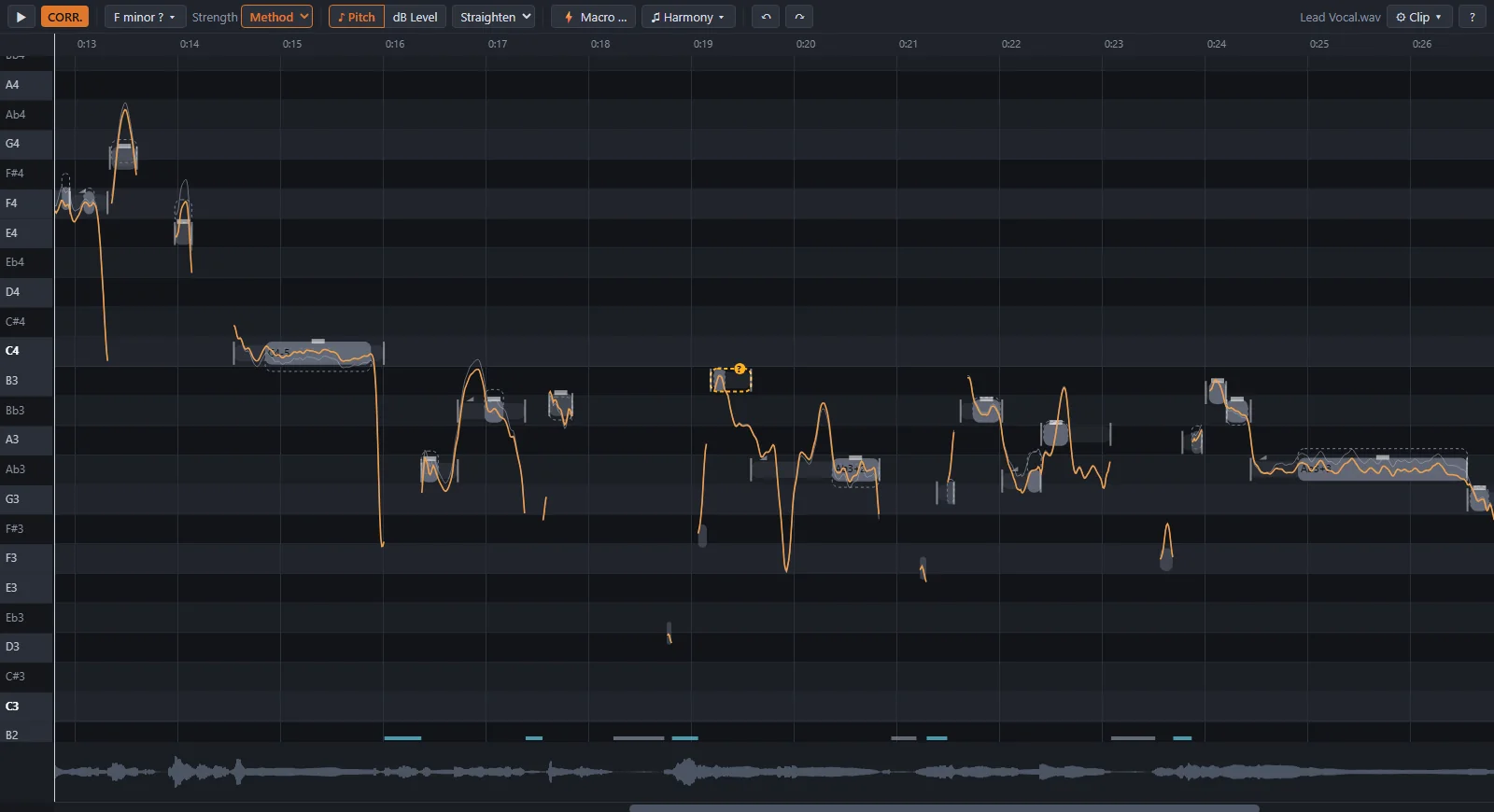
1. Open NaturalTune as an ARA extension
Close your DAW for installation and install the Windows edition. Reopen Cubase and select the vocal audio event. Choose Audio → Extensions → NaturalTune to open the editor. NaturalTune analyses the voice and displays notes and their pitch contours.
The editor requires an ARA 2 host. Our tested setup is Cubase Pro 14, Cubase 15, REAPER on Windows x64. The additional Vocal Rack is a separate VST3 insert and does not require ARA. Installation and requirements.
2. Check the key and intended melody
Choose the right key for the passage. Check suggestions and results against the backing track: a plausible key does not decide which note you intended to sing. Chromatic passing notes, blues notes and deliberate exceptions can require local manual changes.
Start with a short phrase. Listen to the untouched recording and identify what actually bothers you. This keeps correction focused on the musical issue rather than on making the pitch curve look perfectly straight.
3. Start with Natural or Method
Natural shifts pitch position and carries the sung contour with it. Slow drift and vibrato are not additionally straightened. It provides a starting point when the movement already suits the performance.
Method centres sustained pitch sections and reduces slow drift by 50% at its preset. Vibrato is retained. After the automatic pass you can refine individual moments. Method also offers continuous strength from 0 to 100%.
The two stronger modes allow more straightening: Strong removes drift while retaining vibrato; Full removes both. Choose by the intended sound. Slides are carried through the correction; large changes and unusual melodies need careful listening.
4. Refine individual musical choices
Compare the automatic version with the original. Move a sustained note if your intended melody calls for another target. If one detected segment contains two different musical intentions, split it and edit each part separately. Notes can also be joined.
Manual pitch choices take priority over automatic suggestions. Drift, vibrato and transitions can be shaped individually. The workflow lets automatic correction handle recurring groundwork, so you can focus on moments that call for a deliberate choice. The amount of work saved depends on the take and the intended result.
Our product film includes a real comparison with manual refinements. Measurements on the product page describe named listening examples, not a general percentage of labour saved. Watch the chaptered film · View measurements.
5. Compare in the musical context
Listen solo and with the backing at comparable loudness. Check attacks, word endings, slides and exposed sustained notes. If a change weakens the expression, reduce its strength or adjust that moment by hand.
For level and tone, use the separate Vocal Rack: Rider, compressor, automatic de-esser and exciter are individually switchable. The de-esser detects excessive sibilance relative to vocal level; it does not search for a specific problematic frequency. Coordinate the Rack and editor effects so similar processing does not unintentionally add up.
Try it with your own take
The Windows suite is fully unlocked for a 14-day trial. The separate free browser demo lets you explore the editor; uploaded audio is processed on our server and usage limits apply.
Cubase is a Steinberg trademark. This guide describes NaturalTune and does not imply Steinberg endorsement or approval.
Windows and Mac: tested systems
Windows: Windows 10 1903+ or Windows 11, x64; tested with Cubase Pro 14, Cubase 15 and REAPER. Mac: Apple Silicon (arm64), tested on macOS 26 (Tahoe) with Cubase Pro 16.0.5 and REAPER 7.84. Cubase Pro 15 was tested with a pre-release Mac build. Earlier macOS versions have not been tested. The editor requires VST3 and ARA 2; the Vocal Rack does not require ARA. No Logic Pro or Intel Mac support.